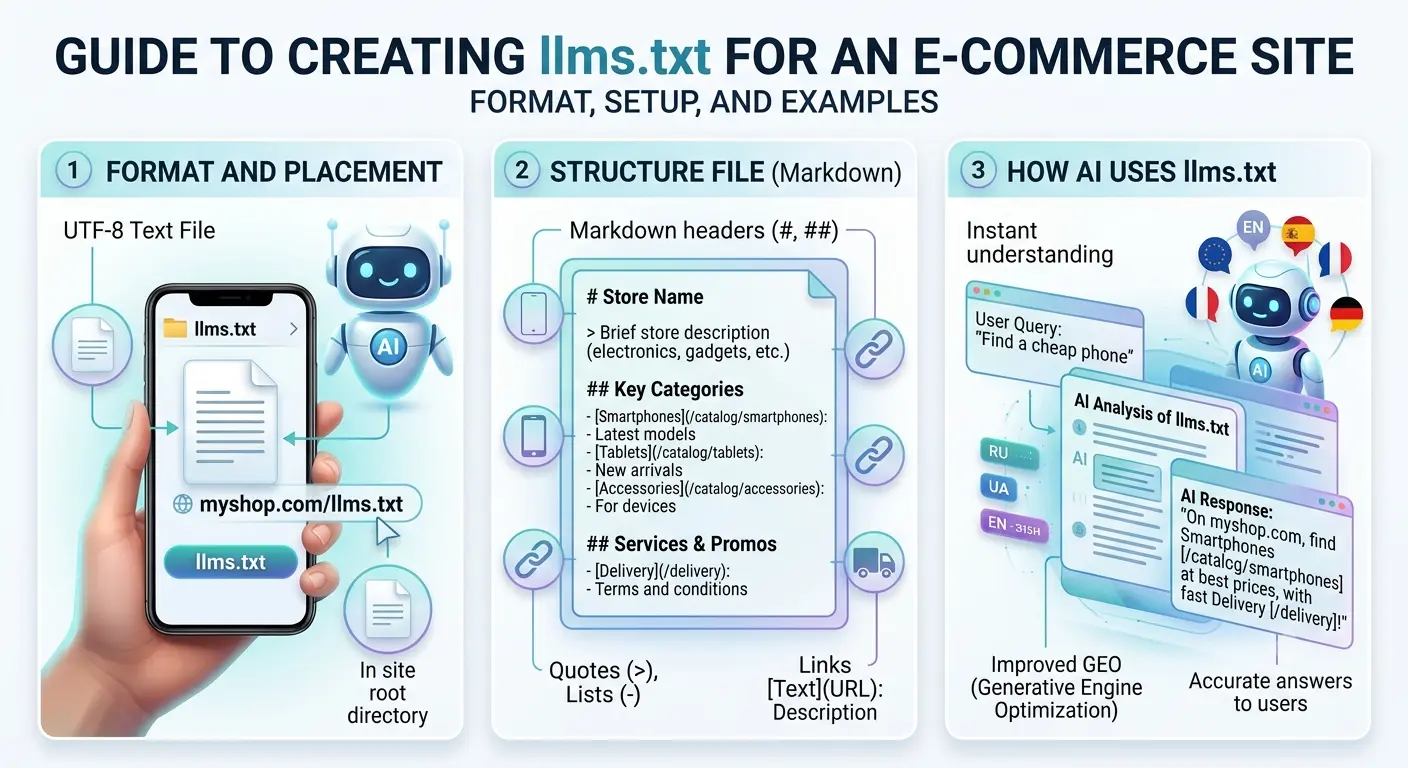
Guide to Creating llms.txt for Your Website. SEO for AI.
Step-by-step guide to setting up the llms.txt file for your website: Markdown format, sections, real-world examples, setup on BooStore, comparison with sitemap.xml and robots.txt.
📄 Table of Contents
- What is llms.txt and why you need it
- llms.txt format and syntax
- Sections and their purpose
- How to set up llms.txt on BooStore
- Full example: our llms.txt
- Formatting recommendations
- Integration with robots.txt
- How llms.txt differs from sitemap.xml and robots.txt
- Practical tips for online stores
- Frequently asked questions
1. What is llms.txt and why you need it
llms.txt is a text file placed in the root of your website (at https://yoursite.com/llms.txt) that contains a brief description of your site, its features, key sections, and links to documentation. The file is written in Markdown format and is designed to be read by language models (GPT, Claude, Llama, Gemini, etc.).
Why your online store needs it:
- Context control: You decide what information AI receives about your business, products, and services. Instead of letting the model "guess" your specifics from random pages, you provide a clear, structured knowledge base.
- Better recommendations: If your assistant or chatbot uses LLMs for responses, having
llms.txtallows it to give accurate answers about your products, prices, discounts, payment methods, and shipping. - AI search promotion: Modern AI-powered search engines (Google SGE, Perplexity, Bing AI) can take
llms.txtinto account when generating answers for users. - Support automation: The file contents can be used for fine-tuning your own model or in a RAG system (Retrieval-Augmented Generation) for customer support.
2. llms.txt format and syntax
The llms.txt file uses a simplified Markdown syntax with a few additional conventions. Let's look at the basic elements.
2.1. Heading structure
The main heading levels are # (H1) and ## (H2). H1 is used for the site/company name, H2 for description sections.
# BooStore.pro — the best SaaS platform for creating websites and online stores
>
> URL: https://boostore.pro/
> Languages: RU, UA, EN, PL
> Type: SaaS (Software as a Service) / Cloud CMS

## Brief description

BooStore is a professional SaaS platform for quickly creating
online stores, service booking sites, landing pages, blogs, and
corporate websites.

## Main modules

- **Store** — storefront, cart, checkout, payment, shipping
- **Pages** — create pages with HTML content, SEO, microdata
- **Blocks/Menu** — block builder with flexible display rules
2.2. Meta-information (block >)
Right after the H1 heading, it's recommended to place a meta-information block formatted as a Markdown quote (> symbol before each line). This block includes:
- Website URL — canonical URL
- Languages — list of supported languages (comma-separated)
- Type — key characteristic (SaaS, CMS, Marketplace, etc.)
- Founded — year of founding / launch
- Additional tags — any relevant data (region, audience, etc.)
> URL: https://boostore.pro/
> Languages: RU, UA, EN, PL
> Founded: 2010
> Type: SaaS (Software as a Service) / Cloud CMS
> Multilingual: all pages available in 4 languages —
  replace `/ru/` with `/en/`, `/ua/` or `/pl/` in the URL
2.3. Lists and nesting
Use bulleted lists (- or *) to list functions, modules, and features. For nested lists — indent by 2 or 4 spaces.
- **Store** — storefront, cart...
- **Pages** — create pages...
  - **Blocks/Menu** — basic site building unit...
    - **Site Header** — inside #hotengine-header
    - **Site Footer** — inside #hotengine-footer
    - **Left / Right** — sidebars
2.4. Links and separators
Provide links to documentation and key pages in Markdown format: [text](URL). Use --- (three dashes) to separate large sections.
## Knowledge base / Documentation

### https://boostore.pro/en/docs/

- All instructions on one page: https://boostore.pro/en/docs/all/
- Video tutorials: https://boostore.pro/en/docs/video-tutorials/#videohelp

---

## Site pages (map)

- Home: https://boostore.pro/en/
- Features overview: https://boostore.pro/en/review.html
2.5. Code blocks (inline and multiline)
Use `backticks` (inline code) for system names, classes, and endpoints. Format multiline code examples with triple backticks and specify the language.
Endpoint: `GET /ajax_get_list_shop.php`
Callback: `callback_hotengine_cart_plus_after_boughtwith`
Class: `.hotengine-shop-product-variety-title_N`
3. Sections and their purpose
Here is the recommended set of sections for an online store or service site llms.txt:
| Section (H2 heading) | Content |
|---|---|
| Brief description | General project description: who you are, what you do, key specialization. 1-3 sentences. |
| Main modules | List all functional blocks with a brief explanation of each. Group by category. |
| Automation | Description of import, synchronization, API, schedulers, robotic processes. |
| Products and catalog | Information about catalog structure, properties, characteristics, variants, filters. |
| Payment systems | List of integrated payment gateways (Fondy, Stripe, LiqPay, Monobank, etc.) |
| Delivery and pickup | Shipping methods, pickup points, logistics API. |
| SEO and promotion | PageSpeed, Schema.org, Sitemap, robots.txt, marketplace exports, Google Merchant. |
| Design and customization | Templates, design editor, block library, full HTML/CSS/JS access. |
| Booking | If there is a booking module — slot description, calendar, prepayment. |
| Statistics and analytics | CRM, Google Analytics, Facebook Pixel, JSON statistics. |
4. How to set up llms.txt on BooStore
The BooStore platform provides built-in functionality for creating and managing llms.txt directly from the admin panel, without needing to edit files on the server.
4.1. Creating an LLM page in the "My Pages" section
- Go to Control Panel → My Pages (or Pages in the sidebar menu).
- Click the "Add Page" button.
- In the editor that opens, find the "Page Type" (or "Functional Pages") selection field.
- From the functional pages list, select "LLM (AI knowledge base / llms.txt)". It is located right after "404 Error Page".
- The system will automatically set the page system name to
llms.
https://your-site/llms.txt with the correct MIME type text/plain; charset=UTF-8. All you need to do is fill it with content.
4.2. Filling the LLM page with content
A large text field for entering content in Markdown format will appear in the page editor. You can write text manually or paste a ready-made template. Supported features:
- Markdown headings (
#,##) - Lists (numbered and bulleted)
- Quotes (
> block) - Code (
`inline`and```block```) - Links (
[text](URL)or just URL) - Separators (
---) - Bold text (
**text**)
Additionally, you can create a separate version of llms.txt for each language (RU, UA, EN, PL). Simply add the corresponding language version of the page through the multilingual tabs in the editor.
4.3. Automatic link generation with shortcodes
You can insert shortcodes into the LLM page text that are automatically replaced with actual link lists when llms.txt is generated. This lets you create a dynamic knowledge base that always contains up-to-date data about your site sections.
Available shortcodes:
{shop_categories}— list of shop categories with links{shop_producers}— list of producers/brands{shop_collections}— list of collections{blog_categories}— list of blog categories{site_pages}— list of all site pages{blog_articles}— list of all blog articles{shop_products}— list of all shop products
Example:
## Shop Categories

{shop_categories}

## Producers

{shop_producers}
During llms.txt generation, each shortcode is replaced with a list of links including titles and SEO descriptions. If no data is available for a section, the shortcode is replaced with "no data". Data is cached and refreshed every 24 hours. To force clear the cache, add ?cacheclear to the llms.txt URL.
4.4. Default auto-generation
If no LLM page is created, the system automatically generates llms.txt with a complete listing of all site sections for each available language: shop categories, producers, collections, blog categories, site pages and blog articles. This ensures that llms.txt is always available and contains up-to-date site structure without manual effort.
5. Full example: our llms.txt (BooStore)
Below is the actual content of the llms.txt file from BooStore. You can use it as a template for your own project, replacing names, links, and descriptions with your own.
# BooStore.pro — the best SaaS platform for creating websites
  and online stores
>
> URL: https://boostore.pro/
> Languages: RU, UA, EN, PL
> Founded: 2010
> Type: SaaS (Software as a Service) / Cloud CMS
> Multilingual: all pages available in 4 languages —
  replace `/ru/` with `/en/`, `/ua/` or `/pl/` in the URL

## Brief description

BooStore is a professional SaaS platform for quickly
creating online stores, service booking sites, landing pages,
blogs and corporate websites. It operates on a "software
rental" model with a free plan.

Key features: full customization via HTML/CSS/JS,
product import automation, built-in CRM, CommerceAPI v2.0,
Booking Engine, integration with payment systems, delivery
services and marketplaces.

## Important features

### Main modules

- **Store** — storefront, cart (custom display via
  a ready-made block or loading in JSON format), checkout,
  payment, delivery, import, sales statistics, invoice generation
- **Pages** — create pages with HTML content, SEO, Schema.org
  markup; functional pages (cart, 404, robots.txt,
  llms.txt, etc.)
- **Articles** — blog/news with categories, SEO and microdata
- **Blocks/Menu** — basic site building unit
- **Widgets and functions** — popups, mobile menu,
  generators, sliders, AJAX and JSON

### Payment systems

Integrated: Monobank, LiqPay, PrivatBank, NovaPay, Hutko, WayForPay, Fondy, iPay,
Stripe, Square, PayPal and others.

### SEO and promotion

- **100/100 Google PageSpeed** — Vanilla JS architecture
- **Schema.org** — structured data for products and reviews
- **Smart Meta** — Title/Description templates for millions of pages
- **Automatic Sitemap.xml**, robots.txt, 301 redirects
- **SEO-friendly URLs** with transliteration, Canonical URL
- **Multilanding** and A/B testing
- Exports: Google Merchant, Yandex XML, Hotline, Rozetka, Prom,
  Facebook Catalog, Epicentr

---

## Knowledge base / Documentation

https://boostore.pro/en/docs/
- All instructions: https://boostore.pro/en/docs/all/
- FAQ: https://boostore.pro/en/docs/faq/
- Video tutorials: https://boostore.pro/en/docs/video-tutorials/

### Documentation sections:
- Admin center: https://boostore.pro/en/docs/admin-panel/
- Data/page types: https://boostore.pro/en/docs/modules/
- Blocks/Menu: https://boostore.pro/en/docs/modules/#ah_pagetypes_blocks
- Store: https://boostore.pro/en/docs/modules/#ah_pagetypes_store
- Forms: https://boostore.pro/en/docs/modules/#ah_pagetypes_form
- Comments/Reviews: https://boostore.pro/en/docs/modules/#hotengine-faq_comments_ajax
- Search filter: https://boostore.pro/en/docs/filters-and-characteristics/
- Multilingual and SEO: https://boostore.pro/en/docs/localization-multilanguage/
- Design and editor: https://boostore.pro/en/docs/design-editor-css/
- Scripts: https://boostore.pro/en/docs/js-callbacks-hooks/
- API and integrations: https://boostore.pro/en/docs/api-integration/
- Product import: https://boostore.pro/en/docs/import-products/
- XML/RSS/YML exports: https://boostore.pro/en/docs/export-feeds-xml/

### Example sites on the platform

- [mirsemyan.com.ua](https://mirsemyan.com.ua/ru/) — Seeds, wholesale/retail, search filter
- [btq.in.ua](https://btq.in.ua/ru/) — Jewelry, search filter
- [servis24.com.ua](https://servis24.com.ua/ru/) — Air conditioners, search filter
- [jabra.store](https://jabra.store/ru/) — Jabra headsets, search filter
- [climatop.in.ua](https://climatop.in.ua/ua/) — Air conditioners, search filter
- [hoopsoutlet.com.ua](https://hoopsoutlet.com.ua/ua/) — Sneakers, search filter, variants
- [peakyclub.com](https://peakyclub.com/en/booking.htm) — Booking
The full file on the site takes over 500 lines and includes all sections: automation, products and catalog, delivery, booking, statistics and analytics, architecture, all tools, script library, visual blocks library, site map, instructions, video tutorials, example sites, and free plan conditions.
6. Formatting recommendations
| Directive / technique | Purpose and recommendation |
|---|---|
| H1 heading | One per file. Contains the site/company name. Clearly identifies what the file is about. |
| Meta block (> ) | Right after H1. URL, languages, type, contacts — everything the LLM should know first. |
| Lists (- or *) | Use for listing capabilities. Nesting — 2 spaces. Each item — no longer than 1-2 lines. |
| **Bold text** | Highlight module or function names. LLMs perceive bold as a key concept. |
| Sections (---) | Separate large semantic blocks. Improves readability for both humans and models. |
| Links | Provide full URLs. LLMs may ignore them, but they serve as information validation. |
| Conciseness | Optimal file size — 100–600 lines. Avoid flowery descriptions; models process facts better. |
| Freshness | Update the file when functionality changes, new modules appear, or pricing changes. |
| Multilingual | Create a separate version for each site language. In BooStore, this is one page with translations. |
7. Integration with robots.txt
To let LLM bots know about your llms.txt, it's recommended to add a special comment to robots.txt. Note: the Sitemap: directive is only for XML maps, so for llms.txt use a comment format:
# LLM knowledge base: https://your-site.com/llms.txt
Additionally, you need to allow LLM bot access in robots.txt. Modern models use the following User-agent strings:
# Allow LLM bots access to llms.txt
User-agent: GPTBot
Allow: /llms.txt

User-agent: ClaudeBot
Allow: /llms.txt

User-agent: PerplexityBot
Allow: /llms.txt

User-agent: Google-Extended
Allow: /llms.txt

User-agent: anthropic-ai
Allow: /llms.txt
8. How llms.txt differs from sitemap.xml and robots.txt
Many website owners confuse llms.txt with traditional files for search robots. In reality, each of these files has its own role and audience.
robots.txt is a directive for search crawlers (Googlebot, YandexBot, etc.) that indicates which sections of the site can be indexed and which are disallowed. It does not contain content descriptions, only access rules.
sitemap.xml is a site map for search engines. It lists all URLs that should be indexed, with priority, modification date, and update frequency. The format is strict XML.
llms.txt is a knowledge base for language models. Unlike the previous two, it does not control indexing but provides a semantic description of the site: what the company does, its products and services, how the catalog is organized, which payment systems are supported, etc.
| Characteristic | robots.txt | sitemap.xml | llms.txt |
|---|---|---|---|
| Format | Text (rules) | XML | Markdown |
| Audience | Search crawlers | Search engines | LLMs (GPT, Claude, Gemini) |
| Purpose | Disallow/allow indexing | Submit pages for indexing | Describe site for AI models |
| Contains business description | No | No | Yes |
| Controls indexing | Yes | Yes | No |
| Human-readable | Somewhat | No | Yes |
| Affects SEO | Yes | Yes | Indirectly (generative SEO) |
| Location | Site root | Site root | Site root |
All three files do not conflict but complement each other. It is recommended to have all three on your site: robots.txt for crawl management, sitemap.xml for search indexing, and llms.txt for AI models.
9. Practical tips for online stores
Implementing llms.txt yields maximum effect when approached strategically. Here are some practical recommendations for e-commerce projects:
9.1. Specify your catalog structure
Describe the hierarchy of categories and subcategories in llms.txt. An LLM can recommend your products more accurately if it understands how the catalog is organized. For example: "Catalog is divided into: Electronics → Smartphones, Laptops, Accessories; Clothing → Men's, Women's, Kids'."
9.2. Add information about promotions and discounts
If you run regular promotions, include them in a separate llms.txt section (## Promotions and offers). AI assistants will reference this data when communicating with customers.
9.3. Describe payment and delivery methods
This is one of the most requested information categories. List all payment gateways, delivery times, regions, pickup points. The more detailed — the more accurate AI responses.
9.4. Use dynamic generation
On BooStore, you can use a PHP file to automatically update llms.txt: current prices, stock quantities, ongoing promotions — all of this can be pulled from the database automatically.
9.5. Regularly check freshness
Add llms.txt update to your checklist when launching new features, changing assortment or prices. Outdated llms.txt can mislead AI.
9.6. Link llms.txt with other pages
Use llms.txt as a central hub for links to documentation, blog, return policy, contacts. This increases data trustworthiness and allows AI to provide source links.
9.7. Don't forget multilingualism
If your store operates in multiple languages, create separate llms.txt for each language. Specify hreflang links in the meta block so the AI can select the correct version.
10. Conclusion
llms.txt is a simple yet powerful tool that allows your business to properly introduce itself in the era of AI search and assistants. By following the rules described above and using the built-in capabilities of BooStore, you can create a full-fledged knowledge base for language models in 15–30 minutes.
- The file must be in the site root (accessible at
/llms.txt). - Format: Markdown, encoding: UTF-8, MIME type:
text/plain. - Start with an H1 heading and meta block
>. - Structure information into H2 sections, use lists.
- Provide links to documentation and key pages.
- Update the file regularly as the site changes.
- Use BooStore — create a service page with the LLM type in the "My Pages" section, and the system will serve it as
/llms.txtwith the correct headers.
❓ Frequently Asked Questions about llms.txt
Answers to the most common questions about setting up and using llms.txt on a website.
What is llms.txt and what is it used for?
llms.txt is a text file in Markdown format placed in the root of your site, containing a structured description of your business, products, and services. It is intended for large language models (LLMs) such as GPT, Claude, Gemini, Perplexity. The file helps AI assistants and AI-based search engines accurately understand what your site is about and provide relevant answers to users.
How is llms.txt different from robots.txt and sitemap.xml?
robots.txt controls search crawler access to site sections. sitemap.xml is a site map for search engines in XML format. llms.txt, however, does not control indexing but provides a semantic business description for AI models. All three files complement each other and are recommended for simultaneous use.
How do I create llms.txt on BooStore?
On BooStore, simply go to Control Panel → My Pages → Add Page, select the page type "LLM (AI knowledge base / llms.txt)" and fill it with content in Markdown format. The system will automatically serve the file at /llms.txt with the correct MIME type text/plain; charset=UTF-8. Multilingualism is supported — a separate version for each language.
Which LLM bots read llms.txt?
The llms.txt file can be read by all major language models and AI search engines: GPTBot (ChatGPT), ClaudeBot (Claude), PerplexityBot (Perplexity), Google-Extended (Google Gemini / SGE), anthropic-ai, and others. To allow LLM bots access to the file, it's recommended to allow their User-agent in robots.txt.
What should be the size of llms.txt?
The optimal file size is between 100 and 600 lines. Don't make it too short (the model won't get enough context) or too long (important details will be lost). Focus on facts: business description, key modules, products, services, contacts, documentation links. Avoid flowery descriptions and promotional text.
How often should I update llms.txt?
It's recommended to update the file with every significant change on the site: adding new product categories, changing prices or assortment, adding new modules, integrating new payment systems, launching promotions. It's also advisable to include links to sale pages and frequently updated sections in llms.txt — this way AI assistants will always receive up-to-date information.
Do I need to create llms-full.txt as well?
llms-full.txt is an extended version that can contain the full content of your site rather than just a brief description. It is recommended to create both: llms.txt for quick AI overview of your business, and llms-full.txt for in-depth analysis. BooStore allows creating unlimited pages for your AI knowledge base.
How to verify that llms.txt is accessible to AI bots?
Check that the file is accessible in your browser at https://yoursite.com/llms.txt. Make sure the server returns status 200 and the correct Content-Type: text/plain; charset=UTF-8. Use webmaster tools to verify AI bot indexing: Google Search Console shows how often Googlebot-Gemini accesses your site. In robots.txt, ensure that User-agent entries for GPTBot, ClaudeBot, and other LLM bots are not blocked.
How does auto-generation of llms.txt work on BooStore?
If you haven't created an LLM page manually, the system automatically generates llms.txt with a complete listing of all site sections in each available language: shop categories, producers, collections, blog categories, site pages and blog articles.
When creating an LLM page, you can use shortcodes for dynamic insertion of up-to-date link lists:
{shop_categories}— shop categories{shop_producers}— producers/brands{shop_collections}— collections{blog_categories}— blog categories{site_pages}— all site pages{blog_articles}— all blog articles{shop_products}— all shop products
Data is cached and refreshed every 24 hours.
Related resources
- Complete Website SEO Guide — basic optimization, keywords, meta tags, PageSpeed.
- Schema.org Structured Data for Products — microdata for better search snippets.
- Why an Online Store Needs a Blog — how content marketing and articles help promotion.
More about BooStore platform: https://boostore.pro/en/
Documentation: https://boostore.pro/en/docs/